Stripe Account
Connect Stripe to accept online payments and receive payouts to your bank. Card processing and order-specific fees apply; review the fee table below before accepting orders.
The same Stripe account is also the prerequisite for Stripe Terminal and Tap to Pay on iPhone.
Create Account
- Open Payment Settings in Back Office.
- Click
Set Up Stripe. - Stripe walks you through its standard onboarding: business details, beneficial owner, bank account, and identity verification.
- Return to Back Office when Stripe confirms the account is active.
With business information ready, the account is typically usable within minutes.
Create a Location
Stripe Terminal and Tap to Pay both require a Location on your Stripe account. The location identifies where the reader is registered.
- In Back Office, open Payment Settings .
- Scroll to the
Locationscard. - Click
+ Addand enter the address of the store where the reader will be used. - Click
Save.
How Customers Pay
Customers pay online when they place an order. Selflane processes the charge through Stripe and rejects payments flagged as fraudulent or insufficient before the order reaches you.
The standard card-processing fee is 3.4% + 30¢ per transaction. Order-specific fees also apply where relevant:
| Sale or service | Fee |
|---|---|
| Alcohol items | 5% of the alcohol-item total |
| Catering orders | 5% of the order subtotal |
| Coupon or promo orders | 5% of the order subtotal |
| Gift card sales | 3% of the gift amount |
| Phone order alerts | 10¢ per order when phone alerts are enabled |
Your agreed rates override the defaults. There is no extra charge for cancelling an order or issuing a partial refund.
Invoicing and paid online table bookings have their own fees. See Invoicing pricing and Booking fees.
Funds and Payouts
Stripe charges the customer’s card and credits the funds to your linked bank account — Selflane never holds the money.
- Cadence: payouts run every Monday for the prior week’s sales.
- Bank holiday: payouts shift to the next business day.
- Settlement delay: funds typically arrive 2 business days after payout.
- Multiple bank accounts: add more than one in Stripe; payouts go to the default account.
- Invoicing: once you send an invoice, Stripe keeps at least $100 back from each payout. See Invoicing pricing.
At year-end, request a 1099 tax form for your online sales free of charge.
Online Transactions
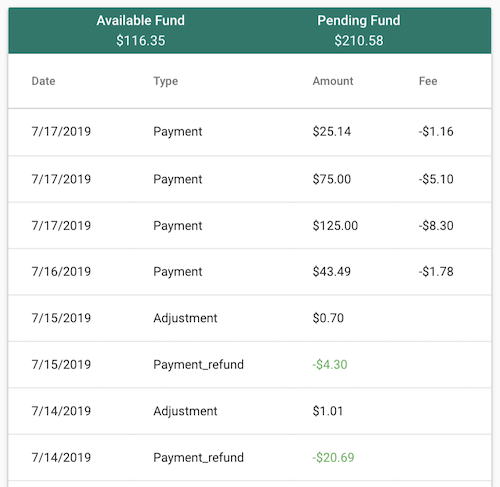
Stripe records each transaction with a balance-transaction Type. The most common types you’ll see in reports:
| Type | Description |
|---|---|
charge | A credit-card charge created successfully. |
payment | An alternative payment-method charge created successfully. |
payment_failure_refund | ACH, direct debit, and other asynchronous methods that stay pending until they succeed or fail. |
payment_refund | An alternative payment-method refund initiated. |
refund | A credit-card charge refund initiated. |
refund_failure | A refund that failed; Stripe returns the funds to your balance. |
Stripe maintains a full reference of balance-transaction types.
Next
- Stripe Terminal — pick a card reader for in-person payments.
- Tap to Pay on iPhone — skip hardware and take payments on an iPhone.